|
|
|
 Products > Single Board Computers > Z-turn Board (Xilinx Zynq-7010/20) > Z-turn Board
 |
| |
 |
Z-turn Board |
- 667MHz Xilinx XC7Z010/020 Dual-core ARM Cortex-A9 Processor with Xilinx 7-series FPGA logic
- 1GB DDR3 SDRAM (2 x 512MB, 32-bit), 16MB QSPI Flash
- USB_UART, USB2.0 OTG, 1 x 10/100/1000Mbps Ethernet, CAN, HDMI, TF, …
- Onboard Three-axis Acceleration Sensor and Temperature Sensor
- Supports Optional Camera Module and Z-turn IO Cape
- Ready-to-Run Linux Single Board Computer
- Supports Python Development
|
|
|
|
| |
|
MYIR is a Xilinx Alliance Member, welcome to use MYIR's Xilinx products!
We also offer ODM & OEM services, welcome your inquiry!
http://www.myirtech.com/xilinxseries.asp
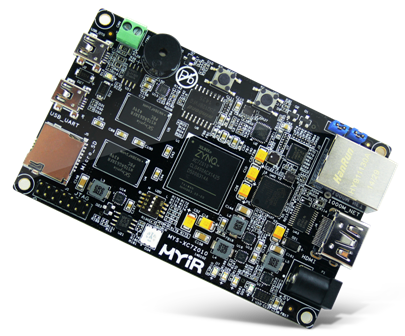
The Z-turn Board is a low-cost and high-performance Single Board Computer (SBC) built around the Xilinx Zynq-7010 (XC7Z010) or Zynq-7020 (XC7Z020) All Programmable System-on-Chip (SoC) which is among the Xilinx Zynq-7000 family, featuring integrated dual-core ARM Cortex-A9 processor with Xilinx 7-series Field Programmable Gate Array (FPGA) logic.
The Z-turn Board takes full features of the Xilinx Z-7010 / Z-7020 SoC, it has 1GB DDR3 SDRAM and 16MB QSPI Flash on board and a set of rich peripherals including USB-to-UART, Mini USB OTG, 10/100/1000Mbps Ethernet, CAN, HDMI, TF, JTAG, Buzzer, G-sensor and Temperature sensor. On the rear of the board, there are two 1.27mm pitch 80-pin SMT female connectors to allow the availability of 96 / 106 user I/O and configurable as up to 39 LVDS pairs I/O.
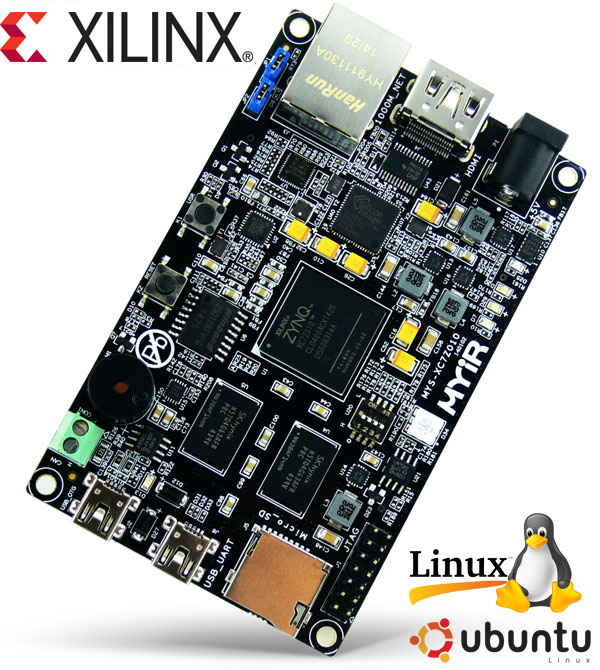
Z-turn Board - Xilinx Zynq-7010 / 7020 Single Board Computer
The Z-turn Board is capable of running Linux operating system. MYIR has provided Linux 4.14.0 SDK, the kernel and many drivers are in source code. MYIR also provides a MYIR-PYNQ project to support Python
development on the Z-turn Board. The board is delivered with complete accessory kit including two USB cables, one Ethernet cable, one HDMI cable, one 16GB TF card and one 5V power adapter and product CD-ROM which enables you to start the development quickly when getting the board out-of-the-box. MYIR also offers optional WiFi and camera modules, Z-turn IO Cape for the Z-turn Board. The Z-turn IO Cape provides many peripheral signals and interfaces including ADC, GPIO, LCD, Camera and three Pmod interfaces.
The Z-turn Board is an excellent development platform for evaluating and prototyping for Zynq-7000 SoC. It can also be used as a System-on-Module (SOM) for your next embedded design; typical applications are Industrial Automation, Test & measurement, Medical Equipment, Intelligent Video Surveillance, Aerospace and military, etc.
Features
|
Item
|
Features
|
|
SoC
|
Xilinx XC7Z010-1CLG400 (Zynq-7010) or XC7Z020-2CLG400 (Zynq-7020)
- 667MHz ARM® dual-core Cortex™-A9 MPCore processor (up to 866MHz)
- Integrated Artix-7 class FPGA subsystem
with 28K logic cells, 17,600 LUTs, 80 DSP slices (for XC7Z010)
with 85K logic cells, 53,200 LUTs, 220 DSP slices (for XC7Z020)
- NEON™ & Single / Double Precision Floating Point for each processor
- Supports a Variety of Static and Dynamic Memory Interfaces
|
|
Memory
|
1GB DDR3 SDRAM (2 x 512MB, 32-bit)
|
|
Storage
|
16MB QSPI Flash
TF card interface
|
|
Communications
|
1 x 10/100/1000M Ethernet
1 x CAN
1 x Mini USB2.0 OTG
1 x USB-UART debug interface
|
|
Display
|
1 x HDMI (supports 1080p resolution)
- We offer reference design for HDMI and LCD display functions without limitation for its. The IP cores in the design are provided by Xilinx. MYIR will provide Vivado project and SDK testing programs.
- We also offer reference design for using evaluation version of Xylon's logiCVC-ML and logiCLK IP core. Please contact Xylon to buy the license of the IP core for logiCVC-ML or logiCLK.
http://www.logicbricks.com/Products/logiCVC-ML.aspx
http://www.logicbricks.com/Products/logiCLK.aspx
|
|
User I/O
|
Brought out via two 1.27mm pitch 80-pin SMT female connectors
- 90/106 user I/O (7010/7020)
- Configurable as up to 39 LVDS pairs I/O
|
|
Dimensions
|
63mm x 102mm x 1.6mm (8-layer PCB design)
|
|
Power supply
|
USB power supply or DC 5V/2A
|
|
Working Temp.
|
0~70 Celsius (commercial grade)
|
|
Others
|
Onboard three-axis acceleration sensor and temperature sensor
1 x 2.54mm pitch 14-pin JTAG interface
2 x Buttons (1x Reset, 1 x User)
4-channel toggle switch
5 x LEDs (3 x User LEDs, 1 x Power indicator, 1 RGB LED)
1 x Buzzer
|
|
OS support
|
Linux 4.14.0
|
|
Target Applications
|
Evaluation and Prototyping for Zynq-7000 AP SoC
Industrial Automation
Test & measurement
Medical Equipment
Intelligent Video Surveillance
Aerospace and military
|
Z-turn Board in the Video
- MYIR Z-turn Board Xilinx 7-series FPGA logic ARM Cortex-A9 System-on-Chip
- How to debug the Xilinx zynq-7020 Z-turn board 01
- How to debug the Xilinx zynq-7020 Z-turn board 02
- How to build a boot.bin bootstrap on Xilinx ZYNQ Z-turn board
- gpio mio project based on Xilinx zynq-7020 Z-turn board
- gpio emio project based on Xilinx zynq-7020 Z-turn board
- Hello world tutorial vivado
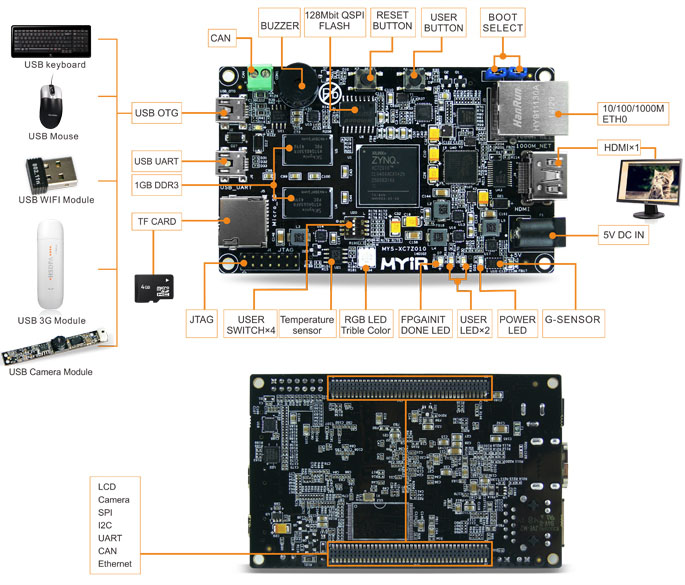
Z-turn Board
Z-turn IO Cape
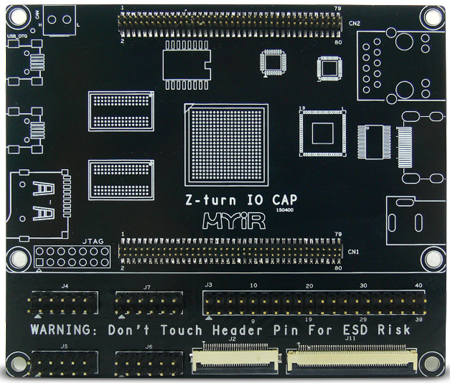  
Z-turn IO Cape (an IO extension board for Z-turn Board)
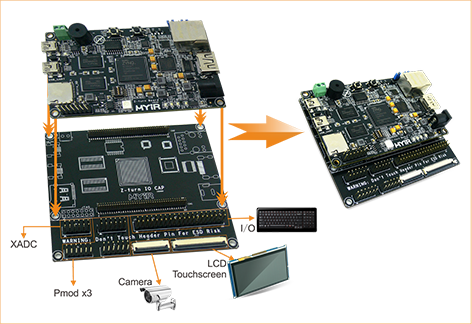
Z-turn Board Mounted on Z-turn IO Cape

Other MYIR's Xilinx Products
http://www.myirtech.com/xilinxseries.asp
Z-turn Lite Single Board Computer (based on Zynq-7010)
MYD-C7Z015 Development Board (MYC-C7Z015 CPU Module as core board, Zynq-7015)
MYD-Y7Z010/20-V2 Development Board (MYC-Y7Z010/20-V2 CPU Module as core board, Zynq-7010 / 7020)
MYD-C7Z010/20-V2 Development Board (MYC-C7Z010/20-V2 CPU Module as core board, Zynq-7010 / 7020)
MYD-CZU3EG/4EV/5EV-V2 Development Board (MYC-CZU3EG/4EG/5EV-V2 CPU Module as core board, ZU3EG/4EV/5EV)
FZ5 Card (AI Accelerator Card based on Zynq UltraScale+ ZU5EV MPSoC)
FZ3 Card - deep learning accelerator card (based on Xilinx Zynq UltraScale+ ZU3EG MPSoC)
|
Hardware Features
The Zynq™-7000 family of devices combines the software programmability of a Processor with the hardware programmability of an FPGA, resulting in unrivaled levels of system performance, flexibility, scalability while providing system benefits in terms of power reduction, lower cost with fast time to market. Unlike traditional SoC processing solutions, the flexible programmable logic of the Zynq-7000 devices enables optimization and differentiation, allowing designers to add peripherals and accelerators to adapt to a broad base of applications.
The Zynq-7000 AP SoC leverages the 28nm scalable
optimized programmable logic used in Xilinx’s 7 series FPGAs. Each device is
designed to meet unique requirements across many use cases and applications.
The Z-7010, Z-7015, and Z-7020 leverage the Artix®-7
FPGA programmable logic
and offer lower power and lower cost for high-volume applications. The Z-7030, Z-7035,
Z-7045, and Z-7100 are based on the Kintex®-7
FPGA programmable logic
for higher-end applications that require higher performance and high I/O
throughput.
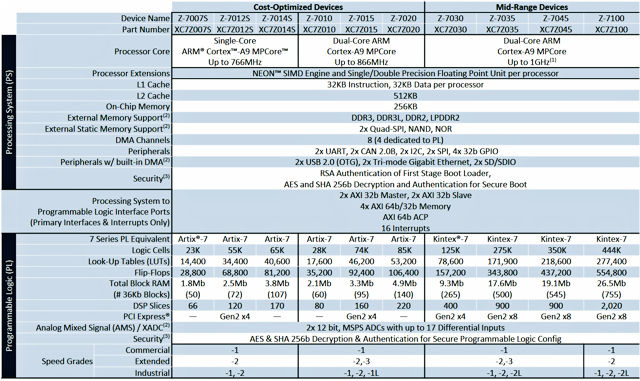
ZYNQ-7000 Device Family
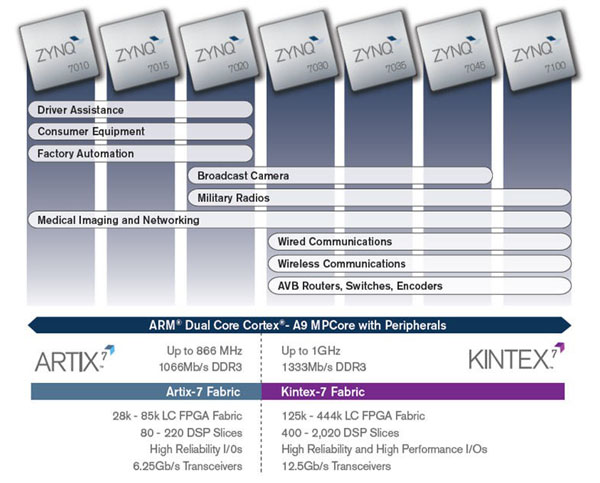
Zynq-7000 Devices
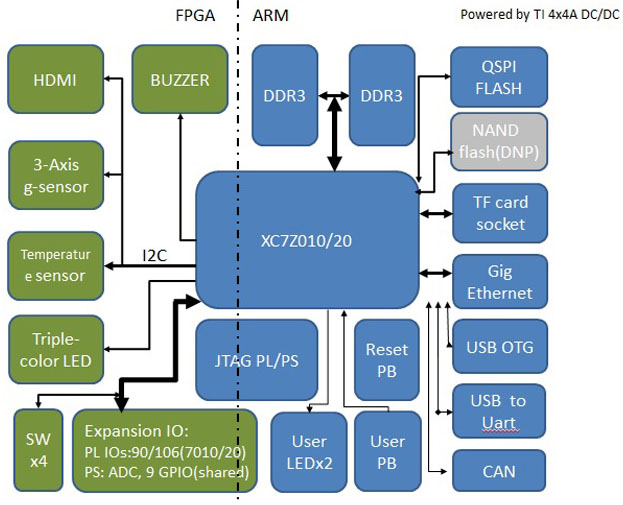
Z-turn Board Function Block Diagram
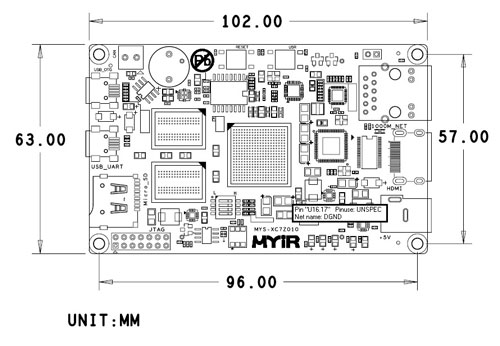
Z-turn Board Dimension Chart (Top-view)
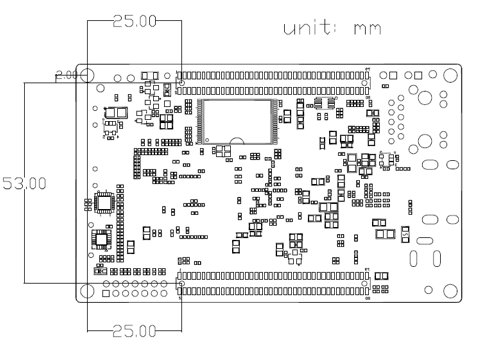
Z-turn Board Dimension Chart (Bottom-view)
|
Software Features
|
Item
|
Features
|
Description
|
|
Cross compiler
|
gcc 6.2.1
|
gcc version 6.2.1 (Linaro GCC Snapshot
6.2-2016.11)
|
|
Boot program
|
BOOT.BIN
|
First boot program including FSBL, bitstream and u-boot
|
|
Linux Kernel
|
Linux 4.14.0
|
Customized kernel for Z-turn Board
|
|
Drivers
|
USB OTG
|
USB OTG driver
|
|
Ethernet
|
Gigabit Ethernet driver
|
|
MMC/SD/TF
|
MMC/SD/TF card driver
|
|
CAN
|
CAN driver
|
|
LCD Controller
|
LCD driver
|
|
HDMI
|
HDMI driver
|
|
Button
|
Button driver
|
|
UART
|
UART driver
|
|
LED
|
LED driver
|
|
GPIO
|
GPIO driver
|
|
Buzzer
|
Buzzer driver
|
|
G-Sensor
|
Three-axis acceleration sensor driver
|
|
Tempreture
Sensor
|
Temperature sensor driver
|
|
File System
|
Ramdisk
|
Ramdisk system image
|
|
Ubuntu Desktop 18.04
|
Tar file
|
|
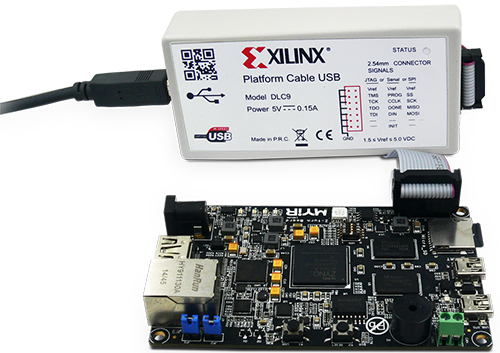
Z-turn Board Supports Xilinx JTAG Cable
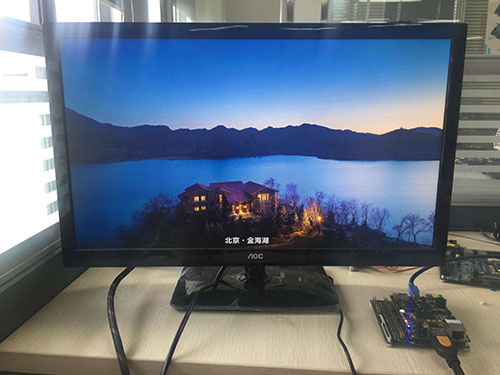
Testing HDMI of Z-turn Board
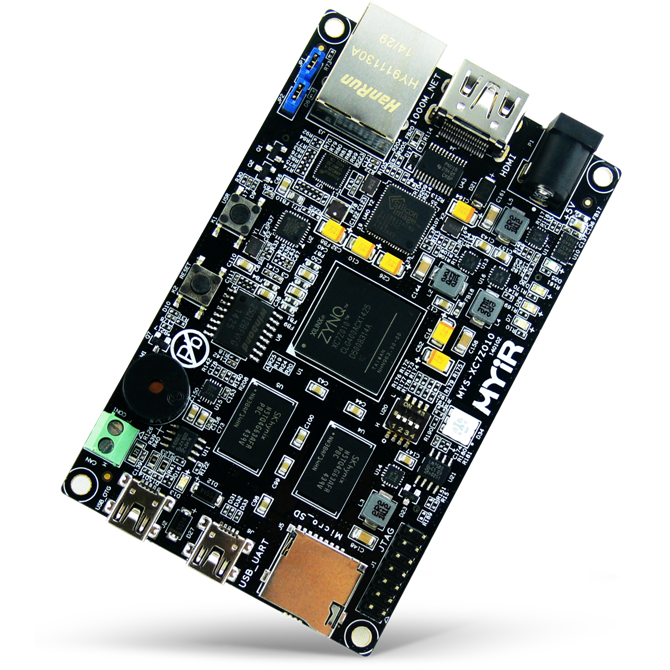
Z-turn Board
|
Price and Ordering
|
Item
|
Part No.
|
Packing List
|
Ordering
|
Z-turn Board
|
MYS-7Z010-C-S
|
- One Z-turn Board (with XC7Z010-1CLG400C SoC)
- One 16GB TF card
- One product disk
|

|
MYS-7Z020-C-S
|
- One Z-turn Board (with XC7Z020-1CLG400C SoC)
- One 16GB TF card
- One product disk
|
|
|
Z-turn Kit
|
MYS-7Z010-C
|
- One Z-turn Board (MYS-7Z010-C-S or MYS-7Z020-C-S)
- One 1.5m cross Ethernet cable
- One 1.5m Mini USB2.0 cable
- One Mini USB OTG Data cable
- One HDMI cable
- One 16GB TF card
- One 5V/2A Power adapter
|
|
MYS-7Z020-C
|
|
MY-TFT070CV2
|
MY-LCD70TP-C 7-inch LCD Module
(Support through Z-turn IO Cape,
with capacitive touch screen)
|
|
MY-CAM002U
|
USB Camera Module
|
|
|
MY-CAPE001
|
Z-turn IO Cape
|
|
|
More FAQ >>
1. How to use Z-turn Board FPGA JTAG for downloading program?Question:How to use Z-turn Board FPGA JTAG for downloading program?Answer:
The FPGA program is
saved in RAM. Every time you need to download it again when power on. Here we
use Platform Cable USB DLC9 to download. The Vivado version is 2014.4. The
Z-turn Board JTAG interface can be used download and debug ARM and FPGA programs.
ARM and FPGA are concatenated at the same JTAG interface, they are distinguished
through ID numbers. The JTAG interface pinouts are as below:
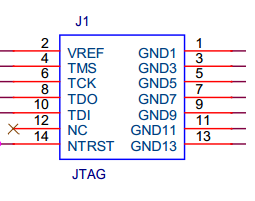
GND can
connect only one and NTRST no needs to be connected.
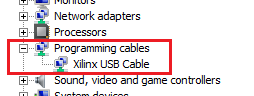
Connect the JTAG emulator with PC, the PC device
manager will appear XilinxUSB Cable:
Before the development
board power on, the JTAG emulator indicator is red, after power on, the
indicator is green.
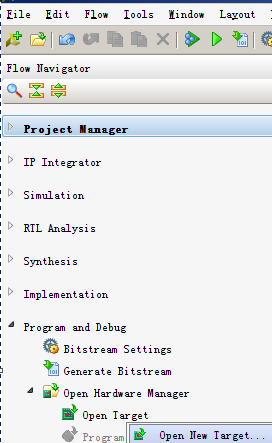
1. Use vivado
2014.4 to open the mys-xc7z010-trd project, click Program and Debug ->Open
Hardware Manager -> Open Target->OpenNew Target on the left Flow
Navigator
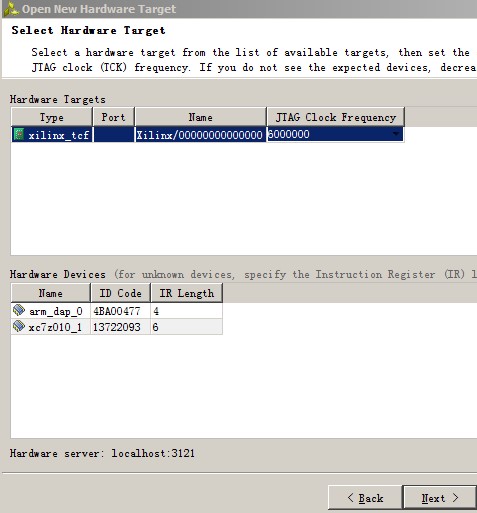
2. Click Next in pop-up Open New Hardware Target
window until the diagram “SelectHardware Target” appears.
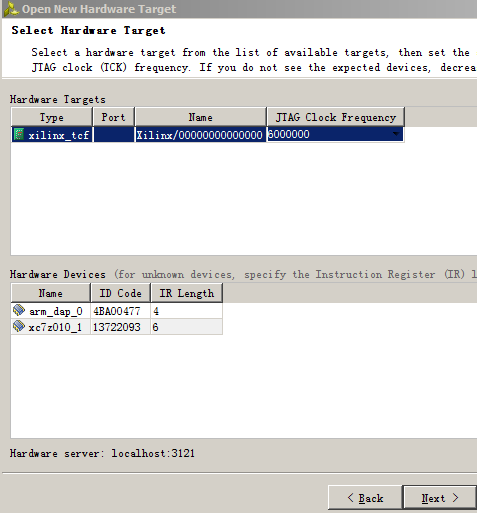
Select xc7z010_1 under HardwareDevice, click Next->Finish.
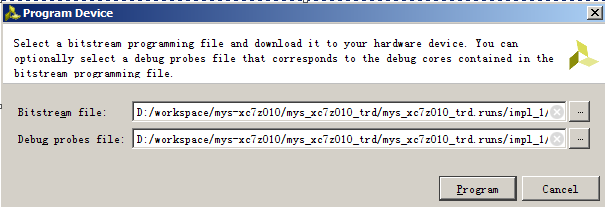
3. After then the Hardware Manager window will open
automatically. Click program device->xc7z010_1 on the window, click Program
in pop-up Program Device diagram to download program.
4. After that the downloadgrogress bar will appear.

After downloading successfully, the D25 on the board will
flick on. Please dial the U20 switch 4 to L, the switch 1, 2 and 3 can control
the RGB LED D34.
The JTAG interface is connected to CPU directly; there are
no any components between them. If you cannot download, please check:
1) If the JTAG emulator and Z-turn board well connected;
2) If the JTAG emulator can be recognized at the PC terminal;
3) If the JTAG emulator status LED is green after the development power
on;
Plug
the USB cable of the JTAG emulator again, power off the board and then power on
again.
2. How to download FPGA program through JTAG?Question:How to download FPGA program through JTAG?Answer:
FPGA
program of ZYNQ is conserved on RAM, you should redownload it when you
electrify the board each time. We could utilize platform cable USB DLC9 to
download it, vivado version is 2014.4. JTAG interface of Z-turn board
could be used to download and debug program of ARM and FPGA, ARM and FPGA are
linked to the same JTAG interface, and it could be distinguished by ID number.
JTAG interfaces of Z-turn board are as follow:
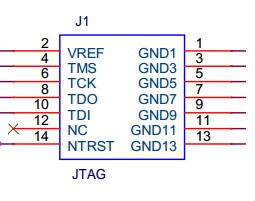
You could just use one string to link GND,
no need to link NTRST.
When
you link the downloader to computer, Xilinx USB Cable will show on device
manager of the computer:
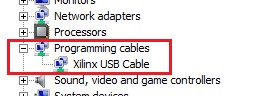
When the board is
not electrified, the status led of downloader is red, it turns green when the
board is electrified.
1. Utilize vivado
2014.0 to open mys-xc7z010-trd project, click Program and Debug ->Open
Hardware Manager -> Open Target->OpenNew Target under the left Flow
Navigator.
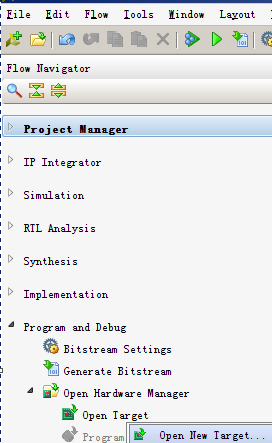
2. Constantly
click “next” on the popup window--Open New Hardware Target, till it appears the
“Select Hardware Target” dialog.
Choose
xc7z010_1 under Hardware Device, click Next->Finish.
3. "Hardware Manager" window will be automatically opened, click program
device->xc7z010_1 on the up window, directly click program to download the
program on the popup window--Program Device dialog.
4.
Download progress window will appear then:

When
you download it successfully, the board’s D25 led will get light, dial U20’s
switch 4 to L. Switch 1,2,3 can control the light’s on and off of the three
-color led D34.
Directly
link the JTAG interface to CPU, there are no elements on connection during the
progress. If it couldn’t be downloaded, please check:
1. Whether
the linked cable between downloader and board are correct?
2.
Whether the downloader could be identified on PC?
3.
Whether the status led of the downloader is green when the board gets
electrified?
4. Re
plug USB cable of the downloader, electrify the board once again.
More FAQ >>
|
|
| |
|
|
|
|


 Overview